
Step 1: Log in to Your Patient Portal
- Go to PrimalZone.com
- Click Login in the top right-hand corner
- Enter your email and continue into your patient portal

Step 2: Go to the Support Page
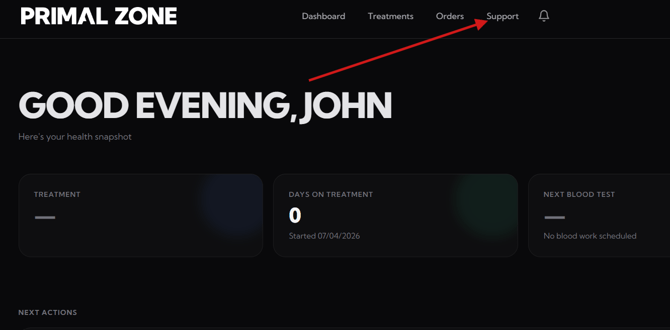
- Click the “Support” tab at the top of the portal
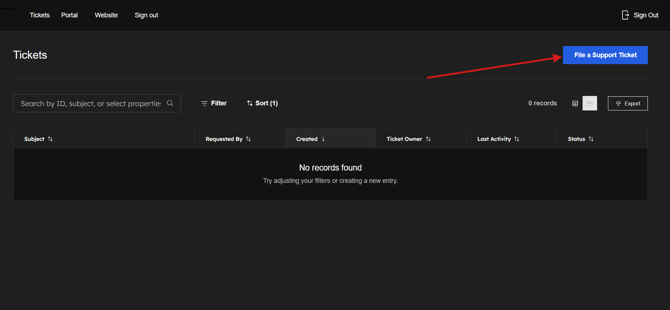
- You will be redirected to the Tickets page
Step 3: Submit a Support Ticket
- Click “File a Support Ticket”
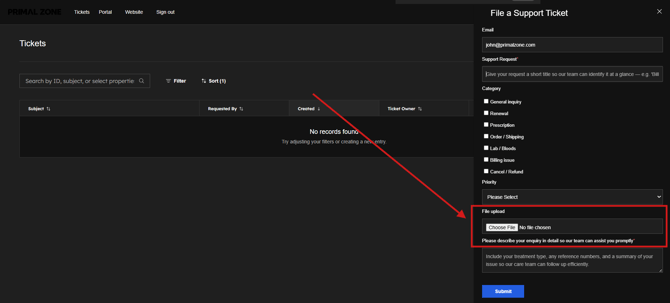
- Enter the details of your request or issue
- Attach a screenshot of the full page if applicable (this helps us investigate faster)
What Happens Next?
- Your request will be logged in our system
- A member of our team will review your ticket
- We will get back to you within 2-3 business days as we complete the review